


When Should You Scale Up vs. Scale Out? A Guide to Choosing the Most Effective Approach
Oct 27, 2026As IT systems evolve, particularly websites, web applications, and digital service platforms, scaling resources becomes almost inevitable. However, deciding how to scale is a challenge that leaves many businesses and technical teams uncertain. In this article, Viettel IDC explains when to scale up and when to scale out, provides a comprehensive comparison of the two approaches, and offers practical guidance to help you choose the most suitable strategy for your system.
What Is Scale Up?
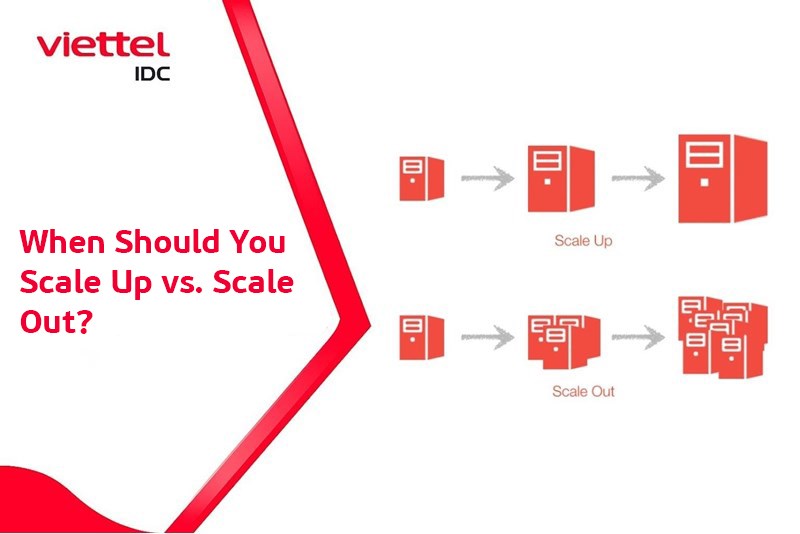
Scale up, also known as vertical scaling, is a method of expanding a system by upgrading the resources of an existing server or node. Instead of adding new servers, you increase the capacity of the current server by upgrading its CPU, RAM, storage drives, or other hardware components.
Simply put, scale up is similar to upgrading a computer: replacing the CPU with a more powerful one, adding more RAM, or installing a higher-capacity SSD to handle more work and process tasks faster.
In traditional environments, scale up is often associated with hardware replacement or upgrades. In Cloud Server environments, however, scaling up is more flexible because you can upgrade server specifications through a management interface in just a few steps, without purchasing physical equipment.
Key characteristics of scale up include:
- The system architecture remains largely unchanged.
- Implementation and management are relatively straightforward.
- It is suitable for monolithic applications.
- Scalability is limited by the available hardware capacity.
Scale up is often the preferred approach during the early stages of a system's lifecycle, when workloads are relatively small, traffic is manageable, and the technical team prioritizes operational simplicity.
What Is Scale Out?
Scale out, also known as horizontal scaling, is a method of expanding a system by increasing the number of servers, nodes, or instances rather than upgrading the resources of a single server.
Instead of relying on one powerful server, you deploy multiple servers that operate in parallel and share the workload. User requests are distributed through a load balancer to help ensure stable and efficient system performance.
Typical examples of scale out include adding multiple web servers to handle high traffic volumes or adding more nodes to a Kubernetes cluster to run application containers.
Key characteristics of scale out include:
- Near-unlimited scalability, depending on the available infrastructure and architecture.
- Improved availability and fault tolerance.
- Suitability for distributed architectures and microservices.
- Greater implementation and operational complexity than scale up.
Comparing Scale Up and Scale Out
When Should You Scale Up a System?
Small Systems or Workloads That Are Not Yet Heavy
For small business websites, blogs, landing pages, and internal applications, traffic is often relatively stable and manageable. Implementing scale out at this stage may waste resources and introduce unnecessary complexity.
Scale up allows you to improve performance quickly without investing significant effort in redesigning the system. It is a common choice for early-stage startups whose primary goal is to bring their products to market quickly.
Applications That Depend Heavily on a Single Server
Many legacy applications and monolithic software systems are designed to run most efficiently on a single server. Traditional databases can also benefit more from faster CPUs and larger amounts of RAM than from being distributed across multiple nodes.
In these situations, scale up helps optimize performance without requiring major changes to the application's architecture.
When Fast Upgrades Are Needed With Minimal Architectural Changes
When a system begins to slow down because of insufficient resources, scale up is often the fastest way to address the problem. You can upgrade server specifications in just a few minutes, potentially minimizing downtime without modifying application code.
This approach is particularly suitable for businesses with small technical teams that prioritize operational simplicity and stability.
When Should You Scale Out a System?
High and Unpredictable Traffic Volumes
E-commerce websites, SaaS platforms, and systems supporting marketing campaigns often experience significant fluctuations in traffic. Scale out allows you to add or remove servers flexibly according to actual demand, helping prevent overload while avoiding unnecessary resource consumption.
Applications Designed for Distributed Architectures
If an application is built using a microservices or cloud-native architecture, scale out is often the preferred approach and may be essential to achieving the desired level of scalability.
Each service can be scaled independently, helping the system operate more efficiently and remain easier to maintain. Containers and Kubernetes have made scale out increasingly common and easier to implement.
High Availability and Fault-Tolerance Requirements
For systems that must operate 24/7, downtime can cause substantial financial losses and reputational damage. Scale out helps distribute risk across multiple nodes: if one node fails, the others can continue serving requests and keep the system running.
Benefits of Scaling Up a System
Scale up, or vertical scaling, offers several clear advantages when a system is relatively simple or needs to expand quickly without major architectural changes.
First, scale up is fast and straightforward to implement. Administrators only need to upgrade the CPU, RAM, SSD capacity, or IOPS of the existing server. There is no need to redesign the system, configure a load balancer, or synchronize data across multiple nodes. This makes scale up particularly suitable for small businesses, startups, and organizations with limited technical resources.
Second, strong single-server performance is a major advantage of scale up. When all resources are concentrated on a powerful server, workloads that require consistent processing, such as traditional databases, accounting software, internal ERP systems, and monolithic applications, can operate efficiently without the additional latency that may arise from distributed processing.
In addition, lower upfront costs are another reason many systems adopt scale up during their early stages. Businesses do not need to invest in multiple additional servers, complex monitoring systems, or specialized personnel to manage distributed architectures.
Benefits of Scaling Out a System
Scale out, or horizontal scaling, is considered a sustainable expansion strategy for modern systems, particularly in cloud environments and applications with high traffic volumes.
The most notable benefit of scale out is its ability to support extensive growth. When demand increases, the system can add servers, instances, or containers to distribute the workload rather than relying on the hardware limits of a single machine.
Another major advantage is improved fault tolerance and high availability, making scale out ideal for systems that operate 24/7. If one node fails, the remaining nodes can continue processing requests, minimizing downtime and helping maintain a consistent user experience.
Scale out is also well suited to cloud-native and microservices architectures. Cloud platforms such as AWS, Azure, and Google Cloud Platform (GCP) support autoscaling, allowing systems to automatically increase or decrease the number of servers or instances based on actual demand. This helps optimize operating costs while maintaining performance.
Common Mistakes When Scaling Systems
One of the most common mistakes is scaling too early without sufficient performance data. Expanding a system based on assumptions rather than measurable evidence can lead to wasted resources and unnecessary costs.
Many businesses also scale the wrong layer of the system. For example, they may focus on expanding the application tier when the actual bottleneck lies in the database or network.
Another common issue is the lack of monitoring, which makes it difficult to determine whether scaling is delivering the expected results.
Effective scaling requires data-driven decisions, accurate measurement, and a clearly defined strategy.
Conclusion
Scale up and scale out are both important strategies for expanding IT systems. Understanding how each approach works, its advantages and limitations, and when to apply it will help you make informed decisions, control costs, and maintain long-term system stability.
If your business wants to deploy Cloud Servers quickly and reliably, consider Viettel IDC's Viettel Cloud Server service. This virtual server solution offers rapid provisioning, high performance, robust security, high availability, and cost efficiency for businesses.
Learn more at: https://viettelidc.com.vn/en/cloud-server
For consultation and more information about Viettel IDC's services, please contact the company through the following channels:
- Hotline: 1800 8088 (toll-free)
- Fanpage: https://www.facebook.com/viettelidc
- Website: https://viettelidc.com.vn
Related news
Do You Need DevOps to Operate a Cloud Server? Insights from Real-World Implementations
In recent years, Cloud Server has become a popular infrastructure platform for almost every type of IT system, ranging from small business websites to large-scale applications. However, alongside the flexibility and scalability of cloud computing comes increasing operational complexity. Many organizations are asking: Do you need DevOps to operate a Cloud Server, or is a traditional IT team sufficient?
Can You Recover Data That Has Been Accidentally Deleted from the Cloud?
Can you recover data that has been accidentally deleted from the cloud? This is a common question among users today. Cloud storage services such as Dropbox, Google Drive, and Microsoft OneDrive all incorporate data protection mechanisms that temporarily retain deleted files for a certain period.
How Do Cloud Providers Protect User Data?
In the era of digital transformation, how cloud providers protect user data has become a major concern for both businesses and individuals. As more data is stored on cloud computing platforms, cloud providers must implement multiple layers of sophisticated security measures to ensure that data remains safe from cyberattacks, data breaches, and infrastructure failures.
Can You Run a Game Server on a Cloud Server? A Detailed Explanation
A Cloud Server is more than just a data storage solution. It can also be used to run games directly, host game servers, or support Cloud Gaming. Viettel IDC will help you understand the capabilities of Cloud Servers in the gaming industry and how to choose the right server configuration for your needs.
Is Cloud Server Suitable for Hosting a WordPress Website? A Detailed Explanation
WordPress is a popular website-building platform, but running a website reliably requires sufficiently powerful and flexible server infrastructure. This is why many businesses ask whether Cloud Server is suitable for hosting a WordPress website when choosing a hosting environment.
How to Improve Cloud Server Performance: Best Optimization Tips
How to improve Cloud Server performance is a common question among businesses running websites or applications on cloud computing platforms. If a server runs slowly or processes data inefficiently, the system may experience performance issues that affect speed and user experience.
What Is the Difference Between Cloud Storage and Cloud Server? A Detailed Comparison
What is the difference between Cloud Storage and Cloud Server? This is a common question among businesses starting to use cloud computing services. Although both are part of the cloud ecosystem, Cloud Storage and Cloud Server serve different purposes and functions in data storage and IT system operations.
What Is an Image Server? How It Works and Its Role in Website Infrastructure
An image server is a server specifically designed to store, process, and deliver images for websites or applications. By using dedicated image processing and delivery mechanisms, an image server helps improve page load speeds, reduce the workload on the main server, and enhance the user experience when accessing a system.
Can Data Be Exposed When Using a Cloud Server? A Detailed Explanation
Can data be exposed when using a Cloud Server? In practice, data can still be exposed if the system is misconfigured or has weak security. However, these risks can be effectively managed by choosing a reputable cloud service provider and implementing appropriate security measures.
Comment ()