


Can You Recover Data That Has Been Accidentally Deleted from the Cloud?
Oct 27, 2026Can you recover data that has been accidentally deleted from the cloud? This is a common question among users today. Cloud storage services such as Dropbox, Google Drive, and Microsoft OneDrive all incorporate data protection mechanisms that temporarily retain deleted files for a certain period. Join Viettel IDC as we explore how to recover deleted files from each service in the following article.
Is It Possible to Recover Data That Has Been Accidentally Deleted from the Cloud?
Data that has been accidentally deleted from the cloud can often be recovered. Most cloud storage platforms are designed with temporary storage mechanisms for deleted files. Rather than deleting files permanently right away, the system typically moves them to a trash folder or marks them as hidden, allowing users to restore them. Depending on the service, this mechanism may work differently:
- Some platforms store deleted files in a Trash or Recycle Bin folder.
- Some services hide deleted files within their original directories.
- Many platforms also retain previous versions of files.
Typically, deleted files are retained for between 30 and 365 days, depending on the service and whether the user has a free or paid plan. Thanks to these mechanisms, recovering data is relatively straightforward if users discover the accidental deletion promptly.
How to Recover Data from Cloud Storage Services
If users accidentally delete data on online storage platforms, they can often recover it by following the correct steps. Below are instructions for restoring data from some of today's most popular cloud storage services.
Recovering Data from Dropbox
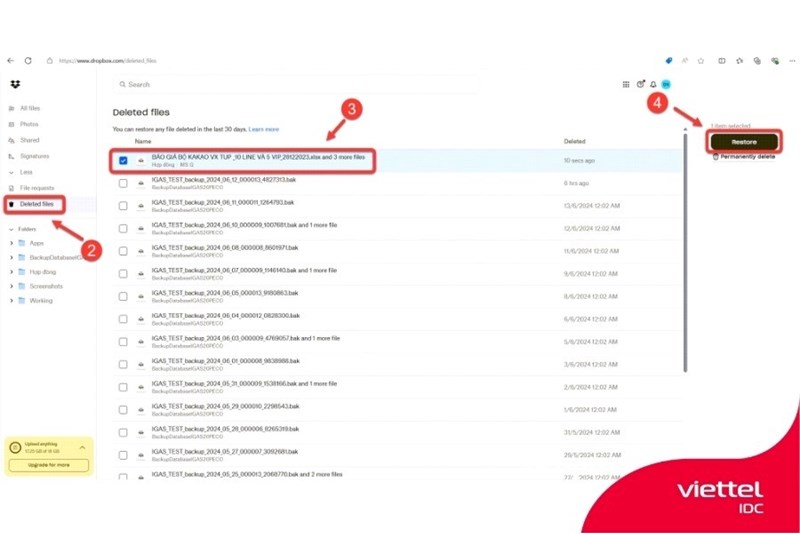
In Dropbox, when a user deletes a file, it may not be removed immediately. Instead, the file is hidden in its original folder. To find a deleted file, navigate to the folder where it was originally stored, then click the Show deleted files icon in the toolbar at the top.
Once this feature is enabled, deleted files will appear in the file list in gray. Simply right-click the file you want to recover and select Restore to return it to its original state.
If you want to delete a file permanently, you can select Permanently delete. Dropbox also offers a Previous versions feature that allows users to view and restore earlier versions of a file if it has been modified.
Recovering Data from Google Drive
Google Drive uses a familiar trash mechanism similar to the Recycle Bin in Windows. When a file is deleted, the system automatically moves it to the Trash folder rather than removing it immediately.
To recover a file, open Google Drive and select Trash from the menu on the left. All deleted files will appear in the panel on the right. You can then select one or more files to restore, right-click, and choose Restore to return them to their original locations.
If you no longer need the files, you can select Delete forever to remove them permanently from the system. Alternatively, to clear the entire trash folder at once, select Empty trash. All data in the folder will then be permanently deleted.
Recovering Data from Microsoft OneDrive
Microsoft OneDrive works similarly to Google Drive: deleted files are moved to the Recycle Bin. To access deleted files, open OneDrive and select Recycle Bin in the lower-left corner of the interface. Once the Recycle Bin is open, a list of deleted files will appear, making it easy to find the items you need.
To restore all deleted files, select Restore all items, and the system will return them to their original locations. If you only need to recover specific files, select the files you want and click Restore to complete the process. Users can also permanently delete files by selecting Empty recycle bin when they want to free up storage space.
Important Considerations When Recovering Cloud Data
Although it is often possible to recover data that has been accidentally deleted from the cloud, users should keep several important factors in mind.
Deleted Files Are Retained for a Limited Time
Most cloud storage services retain deleted files for approximately 30 days on free accounts. Once the retention period expires, the system may automatically remove the files from the trash, making them unavailable through standard recovery procedures. Therefore, deleted files should be checked and restored as soon as possible.
Do Not Empty the Trash Before Checking Its Contents
Files deleted from Google Drive or OneDrive are generally moved to the trash before being permanently removed. When users choose to empty the entire trash folder, all files inside are permanently deleted from the storage system. Before clearing the trash, users should carefully review the file list to avoid losing important data.
Check the File Version History
Some storage services, such as Dropbox and OneDrive, provide file version history. Users can view previous versions and choose the appropriate version to restore. This feature is particularly useful when a file has been overwritten or edited incorrectly.
Back Up Important Data
Storing data on cloud platforms offers a high level of protection, but certain risks remain. Important files should also be backed up to a personal device or another storage service. Maintaining multiple copies across different locations helps minimize the risk of data loss.
Conclusion
As discussed above, recovering data that has been accidentally deleted from the cloud is often possible. Dropbox, Google Drive, and Microsoft OneDrive all provide mechanisms for temporarily retaining deleted files, making it easier for users to restore their data.
In addition to storing personal data on popular cloud services, many businesses today choose more powerful infrastructure platforms to manage and protect their data. One such solution is Viettel IDC's Cloud Server service, which offers stable operations, multilayered security, and flexible scalability to meet changing business needs. Its servers are hosted in internationally certified data centers, helping deliver fast access speeds and a high level of data security.
Learn more about this solution at: https://viettelidc.com.vn/en/cloud-server
For consultation and more information about Viettel IDC's services, please contact the company through the following channels:
- Hotline: 1800 8088 (toll-free)
- Fanpage: https://www.facebook.com/viettelidc
- Website: https://viettelidc.com.vn
Related news
When Should You Scale Up vs. Scale Out? A Guide to Choosing the Most Effective Approach
As IT systems evolve, particularly websites, web applications, and digital service platforms, scaling resources becomes almost inevitable. However, deciding how to scale is a challenge that leaves many businesses and technical teams uncertain.
Do You Need DevOps to Operate a Cloud Server? Insights from Real-World Implementations
In recent years, Cloud Server has become a popular infrastructure platform for almost every type of IT system, ranging from small business websites to large-scale applications. However, alongside the flexibility and scalability of cloud computing comes increasing operational complexity. Many organizations are asking: Do you need DevOps to operate a Cloud Server, or is a traditional IT team sufficient?
How Do Cloud Providers Protect User Data?
In the era of digital transformation, how cloud providers protect user data has become a major concern for both businesses and individuals. As more data is stored on cloud computing platforms, cloud providers must implement multiple layers of sophisticated security measures to ensure that data remains safe from cyberattacks, data breaches, and infrastructure failures.
Can You Run a Game Server on a Cloud Server? A Detailed Explanation
A Cloud Server is more than just a data storage solution. It can also be used to run games directly, host game servers, or support Cloud Gaming. Viettel IDC will help you understand the capabilities of Cloud Servers in the gaming industry and how to choose the right server configuration for your needs.
Is Cloud Server Suitable for Hosting a WordPress Website? A Detailed Explanation
WordPress is a popular website-building platform, but running a website reliably requires sufficiently powerful and flexible server infrastructure. This is why many businesses ask whether Cloud Server is suitable for hosting a WordPress website when choosing a hosting environment.
How to Improve Cloud Server Performance: Best Optimization Tips
How to improve Cloud Server performance is a common question among businesses running websites or applications on cloud computing platforms. If a server runs slowly or processes data inefficiently, the system may experience performance issues that affect speed and user experience.
What Is the Difference Between Cloud Storage and Cloud Server? A Detailed Comparison
What is the difference between Cloud Storage and Cloud Server? This is a common question among businesses starting to use cloud computing services. Although both are part of the cloud ecosystem, Cloud Storage and Cloud Server serve different purposes and functions in data storage and IT system operations.
What Is an Image Server? How It Works and Its Role in Website Infrastructure
An image server is a server specifically designed to store, process, and deliver images for websites or applications. By using dedicated image processing and delivery mechanisms, an image server helps improve page load speeds, reduce the workload on the main server, and enhance the user experience when accessing a system.
Can Data Be Exposed When Using a Cloud Server? A Detailed Explanation
Can data be exposed when using a Cloud Server? In practice, data can still be exposed if the system is misconfigured or has weak security. However, these risks can be effectively managed by choosing a reputable cloud service provider and implementing appropriate security measures.
Comment ()